How does CostPocket robot digitisation work?
Last updated July 6, 2026
CostPocket's AI digitisation extracts accounting data from a receipt or invoice in 3–5 seconds. It combines OCR (optical character recognition), machine learning, company databases, language-specific rules, and AI — and processes hundreds of thousands of documents every month.
If your business only needs data extraction (without the expense management app), you can integrate our standalone DIGI service into your own systems.
The 7 steps of digitisation
- Pre-formatting the input. The uploaded file is cleaned up, standardised, and enhanced to prepare it for digitisation. Multiple file types are supported.
- Optical Character Recognition (OCR). All text, together with its position on the page, is extracted from the image.
- Parsing the OCR output. Our in-house model analyses the extracted text and identifies recognisable data structures.
- Identifying document origin and language. Data structures vary by country, so the system recognises the document's origin and applies country-specific rules learned from years of processing international documents.
- Extracting accounting data. Global data patterns and format-specific rules identify the relevant accounting fields.
- Data validation. Fields such as company details, registration and VAT codes, and VAT rates are cross-checked against public databases.
- Returning results. The submitter reviews and confirms the digitised data before it is sent to the accounting software.
Digitisation itself takes 3–5 seconds; upload time depends on your device and connection. If item line digitisation is enabled, extraction takes longer. Our recognition algorithms improve every week: the system is updated with human-verified data so it learns from past errors.
Example: input and results
From a photographed fuel receipt, CostPocket returns for example: issue date, total amount, VAT sum, document number, currency, and the supplier's name, address, postal code, registration code, and VAT code.
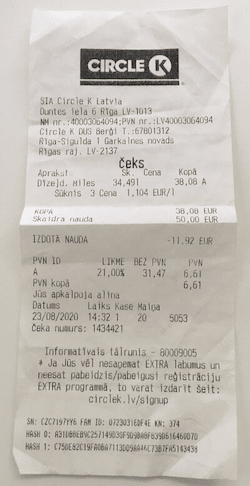
After submission, the CostPocket digitizes and returns the following data:
• Issue date: 2020-08-23
• Total amount: 38.08
• VAT: 6.61
• Document ID: 1434421
• Currency: EUR
• Supplier
○ Name: Circle K Latvia SIA
○ Address: Rīga, Duntes iela 6
○ Postal Code: LV-1013
○ Registration code: 40003064094
○ VAT code: LV40003064094
Frequently asked questions
How long does digitisation take? Robot digitisation takes 3–5 seconds on average. Human-verified digitisation returns confirmed data within 7–9 hours on average.
How accurate is the digitisation? AI digitisation detects key data fields with over 95% accuracy; human-verified digitisation reaches 99.5%. See the accuracy details.
What if a document is digitised incorrectly? Correct the field before submitting, and send a problem example to support so the recognition improves — every reported error trains the system.